
Freestyle2 USB Firmware v1.33 PC

Customers with Freestyle2 keyboards purchased in 2024 or later who are experiencing key “ghosting” issues can perform a simple firmware update to resolve the problem. Check your serial number to confirm if your keyboard supports DIY firmware updates.

800PBUSAAXXXX: Firmware Updates NOT Supported

800PBUSBAXXXX: Firmware Updates Supported (Factory Installed v1.32)

Installation Instructions

  1. Download the file to your PC and unzip
  2. Disconnect the keyboard and flip it over
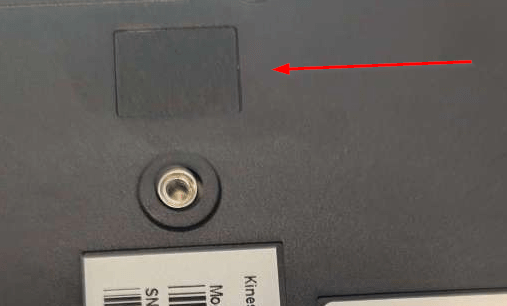
  3. Use a pair of strong tweezers or a thin object to remove the rectangular dark gray adhesive plastic BOOTLOADER BUTTON COVER on the backside of the right key module (see red arrow below). Note: You need to wedge underneath the cover and then pry it up.
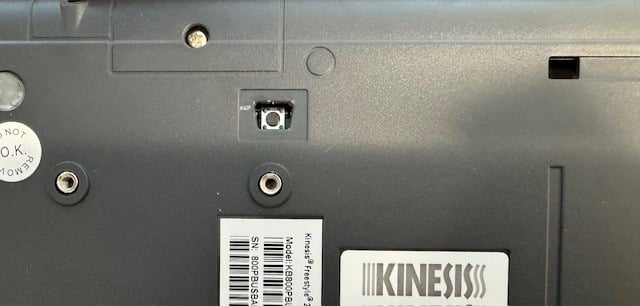
  4. Use a pencil or similar object to depress the exposed bootloader button (shown below) WHILE connecting the keyboard to your PC , release 1-2 seconds after connecting
  5. If done correctly, a removable drive will appear on your PC called “RPI-RP2”
  6. Copy/Paste the firmware file directly to that drive. The file will auto-install.
  7. Disconnect and reconnect your keyboard

Bootloader Button Cover In Place
Bootloader Button Cover Removed
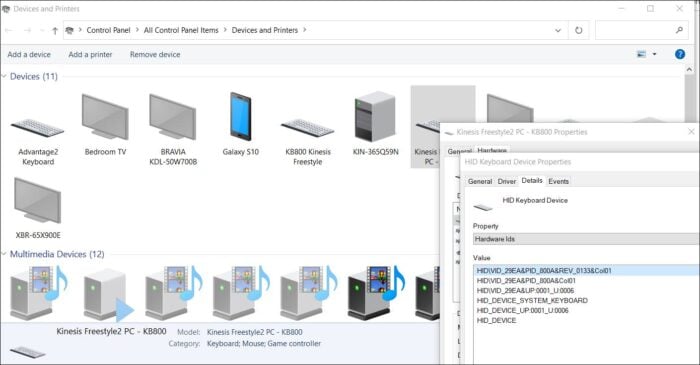
You can confirm the current Firmware Version in Device Manager
Freestyle2 USB Firmware v1.33 Mac

Customers with Freestyle2 keyboards purchased in 2024 or later who are experiencing key “ghosting” issues can perform a simple firmware update to resolve the problem. Check your serial number to confirm if your keyboard supports DIY firmware updates.

800HMBUSAAXXXX: Firmware Updates NOT Supported

800HMBUSBAXXXX: Firmware Updates Supported

Installation Instructions

  1. Download the file to your Mac and unzip
  2. Disconnect the keyboard and flip it over
  3. Use a pair of strong tweezers or a thin object to remove the rectangular dark gray adhesive plastic BOOTLOADER BUTTON COVER on the backside of the right key module (see red arrow below). Note: You need to wedge underneath the cover and then pry it up.
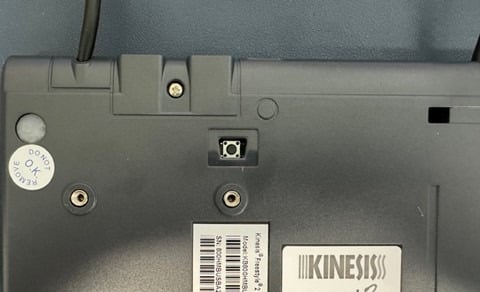
  4. Use a pencil or similar object to depress the exposed bootloader button (shown below) WHILE connecting the keyboard to your Mac, release 1-2 seconds after connecting
  5. If done correctly, a removable drive will appear on your Mac called “RPI-RP2”
  6. Copy/Paste the firmware file directly to that drive. The file will auto-install but your Mac may generate a file transfer message error message.
  7. Disconnect and reconnect your keyboard

Bootloader Button Cover In Place

Bootloader Button Cover Removed

©2026 KINESIS
advanced-floating-content-close-btn

Qualified EH&S Professionals
Get Your Free Sample